Same article quote, seventy polished hfviewer-style treatments. These are intentionally
isolated from the real article styling so they can be compared side by side.
Variant 01
Prism rail
Closest to the current article language, but with a more deliberate glow and depth.
This article explains mHC in DeepSeek V4 through visual explanations and short animations to build clear intuition around the mHC.
Variant 02
Folded glass
A subtle document-card feel with a bright folded corner instead of a classic quote mark.
This article explains mHC in DeepSeek V4 through visual explanations and short animations to build clear intuition around the mHC.
Variant 03
Signal frame
A technical conic border and faint scan-lines, closer to model-graph instrumentation.
This article explains mHC in DeepSeek V4 through visual explanations and short animations to build clear intuition around the mHC.
Variant 04
Editorial shell
The older left-accent idea, but as a gradient shell behind an inset article card.
This article explains mHC in DeepSeek V4 through visual explanations and short animations to build clear intuition around the mHC.
Variant 05
Graph glow
Node-like dots and soft graph geometry integrated into the quote surface.
This article explains mHC in DeepSeek V4 through visual explanations and short animations to build clear intuition around the mHC.
Variant 06
Layer stack
Feels like a compact stack of model-card layers, with enough weight for lead quotes.
This article explains mHC in DeepSeek V4 through visual explanations and short animations to build clear intuition around the mHC.
Variant 07
Insight capsule
A more iconic pill shape with a glowing green anchor, good for short high-signal quotes.
This article explains mHC in DeepSeek V4 through visual explanations and short animations to build clear intuition around the mHC.
Variant 08
Aurora card
A richer atmospheric quote card using the hfviewer blue/green/pink glow system.
This article explains mHC in DeepSeek V4 through visual explanations and short animations to build clear intuition around the mHC.
Variant 09
Blueprint
A crisp technical panel with subtle grid structure and a low bottom accent line.
This article explains mHC in DeepSeek V4 through visual explanations and short animations to build clear intuition around the mHC.
Variant 10
Minimal pro
The quietest option: premium, readable, and less decorative while still themed.
This article explains mHC in DeepSeek V4 through visual explanations and short animations to build clear intuition around the mHC.
Variant 11
Margin rail
An open editorial quote: no full card, just a luminous margin cue and a soft reading surface.
This article explains mHC in DeepSeek V4 through visual explanations and short animations to build clear intuition around the mHC.
Variant 12
Corner field
Open corners instead of a container, like the article is selecting an insight on the canvas.
This article explains mHC in DeepSeek V4 through visual explanations and short animations to build clear intuition around the mHC.
Variant 13
Underline pulse
Mostly typography: a strong quote line with a layered hfviewer underline rather than a block.
This article explains mHC in DeepSeek V4 through visual explanations and short animations to build clear intuition around the mHC.
Variant 14
Diagonal shard
A more angular model-paper surface, deliberately avoiding the normal rounded rectangle.
This article explains mHC in DeepSeek V4 through visual explanations and short animations to build clear intuition around the mHC.
Variant 15
Terminal line
A technical prompt-style quote for article passages that should feel precise and executable.
This article explains mHC in DeepSeek V4 through visual explanations and short animations to build clear intuition around the mHC.
Variant 16
Node path
The quote starts at small graph nodes, making the article-to-visualizer relationship feel native.
This article explains mHC in DeepSeek V4 through visual explanations and short animations to build clear intuition around the mHC.
Variant 17
Manuscript mark
A marked-up research-note treatment with line rhythm and small colored anchor points.
This article explains mHC in DeepSeek V4 through visual explanations and short animations to build clear intuition around the mHC.
Variant 18
Theorem strip
A compact paper-like statement row; structured, open, and less visually boxed.
This article explains mHC in DeepSeek V4 through visual explanations and short animations to build clear intuition around the mHC.
Variant 19
Waveform
A subtle signal/animation-inspired quote treatment with no explicit card boundary.
This article explains mHC in DeepSeek V4 through visual explanations and short animations to build clear intuition around the mHC.
Variant 20
Glass cutout
A cut-corner glass panel: still premium and readable, but less like a conventional roundrect.
This article explains mHC in DeepSeek V4 through visual explanations and short animations to build clear intuition around the mHC.
Variant 21
Dot anchor
A single characteristic glowing dot becomes the quote’s origin point and vertical guide.
This article explains mHC in DeepSeek V4 through visual explanations and short animations to build clear intuition around the mHC.
Variant 22
Orbit dot
The dot sits inside a small orbit, making the quote feel like an inspected graph state.
This article explains mHC in DeepSeek V4 through visual explanations and short animations to build clear intuition around the mHC.
Variant 23
Node chain
A small row of glowing graph nodes leads into the quote without needing a traditional box.
This article explains mHC in DeepSeek V4 through visual explanations and short animations to build clear intuition around the mHC.
Variant 24
Pinned insight
A glowing dot pins the top-left corner, giving the quote a precise annotated-paper feel.
This article explains mHC in DeepSeek V4 through visual explanations and short animations to build clear intuition around the mHC.
Variant 25
Constellation
Several small glowing dots and faint connections give the quote a more model-graph-native identity.
This article explains mHC in DeepSeek V4 through visual explanations and short animations to build clear intuition around the mHC.
Variant 26
Beacon
The glowing dot acts like a signal beacon, with soft rings and a directional trail.
This article explains mHC in DeepSeek V4 through visual explanations and short animations to build clear intuition around the mHC.
Variant 27
Split rail dot
A dot interrupts a vertical rail, so the quote feels selected without becoming a boxed card.
This article explains mHC in DeepSeek V4 through visual explanations and short animations to build clear intuition around the mHC.
Variant 28
Endpoint dots
The quote is suspended between two glowing endpoints, like an edge label in the graph.
This article explains mHC in DeepSeek V4 through visual explanations and short animations to build clear intuition around the mHC.
Variant 29
Spotlight dot
A centered dot shines down onto the quote, making it feel like a highlighted article thesis.
This article explains mHC in DeepSeek V4 through visual explanations and short animations to build clear intuition around the mHC.
Variant 30
Inline dot badge
The glowing dot becomes part of the text rhythm itself rather than a surrounding container.
This article explains mHC in DeepSeek V4 through visual explanations and short animations to build clear intuition around the mHC.
Variant 31
Dot anchor clean
Variant 21 without the vertical green line: just a dot, a soft field, and strong text.
This article explains mHC in DeepSeek V4 through visual explanations and short animations to build clear intuition around the mHC.
Variant 32
Dot halo
The dot gets a thin halo ring instead of a line, giving it more presence without boxing the quote.
This article explains mHC in DeepSeek V4 through visual explanations and short animations to build clear intuition around the mHC.
Variant 33
Left glow wash
The dot is supported by a broad atmospheric glow rather than any visible edge or rail.
This article explains mHC in DeepSeek V4 through visual explanations and short animations to build clear intuition around the mHC.
Variant 34
Dot notch
A tiny horizontal trace replaces the vertical line, keeping the quote anchored but cleaner.
This article explains mHC in DeepSeek V4 through visual explanations and short animations to build clear intuition around the mHC.
Variant 35
Inline leader dot
The dot becomes the first typographic unit, making the quote read like a premium thesis line.
This article explains mHC in DeepSeek V4 through visual explanations and short animations to build clear intuition around the mHC.
Variant 36
Floating pin
The dot floats above the quote like a selected graph node, without needing a surrounding block.
This article explains mHC in DeepSeek V4 through visual explanations and short animations to build clear intuition around the mHC.
Variant 37
Soft dot field
The closest to Variant 21, but with only the dot and background atmosphere; no line or trace.
This article explains mHC in DeepSeek V4 through visual explanations and short animations to build clear intuition around the mHC.
Variant 38
Blue dot anchor
A blue version using the other hfviewer signature color, lighter and more graph-view aligned.
This article explains mHC in DeepSeek V4 through visual explanations and short animations to build clear intuition around the mHC.
Variant 39
Dot with echo
The main green dot gets a small pink echo dot, creating more visual rhythm without a rail.
This article explains mHC in DeepSeek V4 through visual explanations and short animations to build clear intuition around the mHC.
Variant 40
Thesis mark
The most minimal Variant 21 derivative: a small glowing dot as a quiet thesis marker.
This article explains mHC in DeepSeek V4 through visual explanations and short animations to build clear intuition around the mHC.
Variant 41
Thesis soft glow
Variant 40’s quiet dot, but with Variant 37’s soft atmospheric glow and a subtle breathing pulse.
This article explains mHC in DeepSeek V4 through visual explanations and short animations to build clear intuition around the mHC.
Variant 42
Wide soft field
A slightly larger soft field around the thesis dot, still no rail and no obvious quote container.
This article explains mHC in DeepSeek V4 through visual explanations and short animations to build clear intuition around the mHC.
Variant 43
Small breathing mark
A smaller, calmer dot with the same soft-field logic; more understated than Variant 41.
This article explains mHC in DeepSeek V4 through visual explanations and short animations to build clear intuition around the mHC.
Variant 44
Left bloom
The dot breathes from inside a wider left-side bloom, giving the quote more presence without a border.
This article explains mHC in DeepSeek V4 through visual explanations and short animations to build clear intuition around the mHC.
Variant 45
Quiet breath
The least decorative animated version: only a faint field and a slow breathing dot.
This article explains mHC in DeepSeek V4 through visual explanations and short animations to build clear intuition around the mHC.
Variant 46
Blue-green field
The green dot stays central, while the field borrows more of the hfviewer graph-view blue.
This article explains mHC in DeepSeek V4 through visual explanations and short animations to build clear intuition around the mHC.
Variant 47
Edge thesis dot
The dot sits just outside the text rhythm, closer to a margin mark than a quote block.
This article explains mHC in DeepSeek V4 through visual explanations and short animations to build clear intuition around the mHC.
Variant 48
Double breath field
A second faint blue echo breathes behind the dot, adding depth without adding another visible marker.
This article explains mHC in DeepSeek V4 through visual explanations and short animations to build clear intuition around the mHC.
Variant 49
Top note
The glowing dot moves above the quote, like a quiet article annotation rather than a left rail.
This article explains mHC in DeepSeek V4 through visual explanations and short animations to build clear intuition around the mHC.
Variant 50
Underline glow thesis
The minimal dot stays, but the breathing glow also runs into a very subtle bottom underline.
This article explains mHC in DeepSeek V4 through visual explanations and short animations to build clear intuition around the mHC.
Variant 51
Unclipped thesis soft glow
Variant 41 with the same breathing atmosphere, but the left glow is allowed to continue outside the comparison card.
This article explains mHC in DeepSeek V4 through visual explanations and short animations to build clear intuition around the mHC.
Variant 52
Unclipped wide soft field
Variant 42 with a wider visible bloom that bleeds beyond the quote’s left edge instead of being cut flat.
This article explains mHC in DeepSeek V4 through visual explanations and short animations to build clear intuition around the mHC.
Variant 53
Unclipped small breathing mark
Variant 43 with the same small mark, now letting the soft halo extend naturally past the sample boundary.
This article explains mHC in DeepSeek V4 through visual explanations and short animations to build clear intuition around the mHC.
Variant 54
Unclipped left bloom
Variant 44 with the strongest left-side glow, designed specifically to read as a seamless bloom outside the quote.
This article explains mHC in DeepSeek V4 through visual explanations and short animations to build clear intuition around the mHC.
Variant 55
Unclipped quiet glow
Variant 45 with a lower-intensity bleed, useful if the glow should feel present but not decorative.
This article explains mHC in DeepSeek V4 through visual explanations and short animations to build clear intuition around the mHC.
Variant 56
Unclipped blue-green glow
Variant 46 with the blue secondary field kept visible while the green thesis glow bleeds past the left edge.
This article explains mHC in DeepSeek V4 through visual explanations and short animations to build clear intuition around the mHC.
Variant 57
Unclipped edge spark
Variant 47 keeps the dot close to the edge, but removes the hard crop so it feels intentionally anchored there.
This article explains mHC in DeepSeek V4 through visual explanations and short animations to build clear intuition around the mHC.
Variant 58
Unclipped double breath
Variant 48 with both green and blue breathing fields visible beyond the quote, giving the mark more depth.
This article explains mHC in DeepSeek V4 through visual explanations and short animations to build clear intuition around the mHC.
Variant 59
Unclipped top note
Variant 49 with extra room for the upper note glow, preventing the top-left atmosphere from being clipped.
This article explains mHC in DeepSeek V4 through visual explanations and short animations to build clear intuition around the mHC.
Variant 60
Unclipped underline glow
Variant 50 with the underline and left glow free to breathe past the sample boundary instead of ending abruptly.
This article explains mHC in DeepSeek V4 through visual explanations and short animations to build clear intuition around the mHC.
Variant 61
Static thesis glow, card-clipped
Variant 51 without breathing motion: the blob can leave the quote, but the article card remains the outer mask.
This article explains mHC in DeepSeek V4 through visual explanations and short animations to build clear intuition around the mHC.
Variant 62
Static wide field, card-clipped
Variant 52 made still, with the glow contained by the article border instead of the quote boundary.
This article explains mHC in DeepSeek V4 through visual explanations and short animations to build clear intuition around the mHC.
Variant 63
Static small mark, card-clipped
Variant 53 with no motion; a quieter dot that still casts past the quote line without escaping the card.
This article explains mHC in DeepSeek V4 through visual explanations and short animations to build clear intuition around the mHC.
Variant 64
Static left bloom, card-clipped
Variant 54 without animation: the strongest bloom continues beyond the quote, then resolves at the article border.
This article explains mHC in DeepSeek V4 through visual explanations and short animations to build clear intuition around the mHC.
Variant 65
Static quiet glow, card-clipped
Variant 55 with the calm field locked in place, useful for a less animated article quote treatment.
This article explains mHC in DeepSeek V4 through visual explanations and short animations to build clear intuition around the mHC.
Variant 66
Static blue-green glow, card-clipped
Variant 56 without motion, preserving the blue secondary glow while clipping only at the article frame.
This article explains mHC in DeepSeek V4 through visual explanations and short animations to build clear intuition around the mHC.
Variant 67
Static edge spark, card-clipped
Variant 57 made still, so the edge dot feels anchored while its glow is masked by the card rather than the quote.
This article explains mHC in DeepSeek V4 through visual explanations and short animations to build clear intuition around the mHC.
Variant 68
Static double glow, card-clipped
Variant 58 with fixed green and blue glow masses, contained by the article card instead of the quote rectangle.
This article explains mHC in DeepSeek V4 through visual explanations and short animations to build clear intuition around the mHC.
Variant 69
Static top note, card-clipped
Variant 59 without motion; the top-note glow has room to leave the quote while staying inside the article card.
This article explains mHC in DeepSeek V4 through visual explanations and short animations to build clear intuition around the mHC.
Variant 70
Static underline glow, card-clipped
Variant 60 made still, keeping the underline haze clipped by the article card instead of the quote itself.
This article explains mHC in DeepSeek V4 through visual explanations and short animations to build clear intuition around the mHC.
Article moderation
Review reports.
Triage reported model articles and comments, hide abusive content, and resolve cases.
Sign in with the HannesVonEssen Hugging Face account to review reports.
No moderation reports match this filter.
Write model article
Model article
Create an interactive article around the graph.
Sign in with Hugging Face to write a model article where the text can point directly to graph nodes,
highlight architecture details, and keep the visualization beside the article.
Mention modules and node types inline with graph-aware autocomplete.
Publish an owner or community article next to the model page visualization.
Use the same interactive reading style as the Gemma 4 family article.
The Hugging Face ecosystem already has model cards, Spaces, checkpoints,
benchmarks, and demos. What it has still been missing is a fast general-purpose
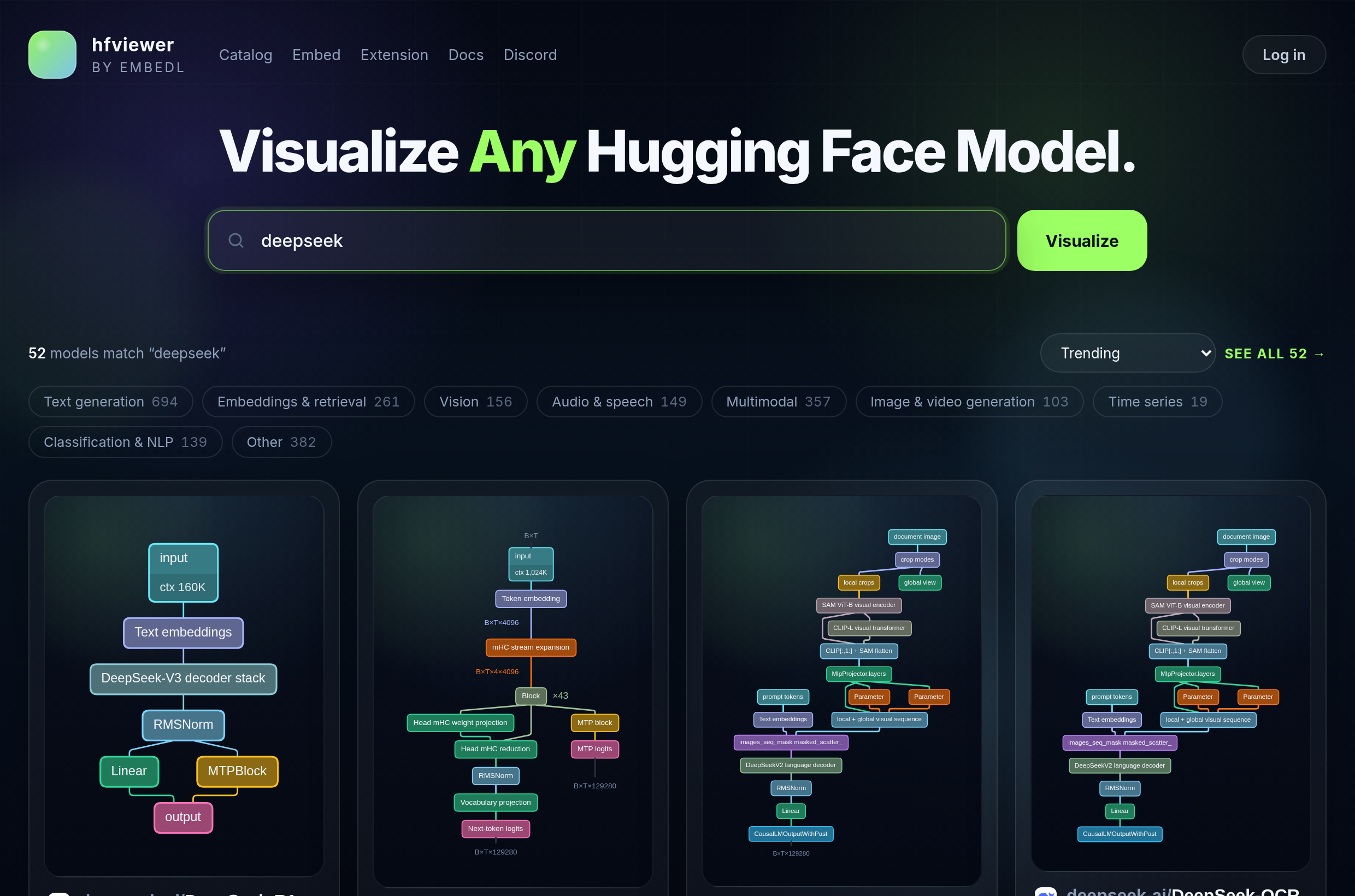
way to see how a model is put together. We built
hfviewer.com to fill that gap:
paste a Hugging Face model URL, open an interactive architecture graph in the
browser, and move between overview and detail without installing anything.
This is our way of giving back to the Hugging Face community.
Why we built it
We kept running into the same problem: a model card can tell you
what a model is for, but it rarely helps you inspect the actual
structure quickly. If you want to understand where the vision encoder enters, how
the decoder repeats, whether the model routes through experts, or how a multimodal
merge happens, you often end up reading config files, staring at code, or building
your own mental graph from scattered clues.
hfviewer is meant to make that first architectural pass much
faster. You can open a model directly from the Hugging Face URL, get a visual map
in the browser, and then zoom from the broad system shape down into the more
specific substructure that matters for understanding deployment, latency, and
correctness.
What hfviewer does
Open models directly from Hugging Face
Paste a model URL or repo id and open the graph without a local setup or
notebook workflow.
Switch between overview and detail
Granularity levels let you move from the high-level architecture down to more
specific traced blocks and paths.
Compare model families
Family pages such as Gemma 4 let you compare
multiple related models with synchronized interaction instead of isolated
screenshots.
This loop shows
embedl/Cosmos-Reason2-2B-W4A16-Edge2
as a natively rendered higher-resolution center-column crop at 2x speed,
keeping the core granularity transition prominent while the info panel stays
out of view.
A new kind of interactive blog
One of the most interesting things hfviewer enables is not just a
prettier model page, but a new kind of technical article. On the
Gemma 4 family page, the blog text and the graph are
connected. You can read a section about a particular architectural decision, jump
into the corresponding part of the graph, and then move back into the article with
the surrounding context still intact.
That matters because model understanding is rarely linear. Sometimes you start from
prose and need to verify it visually. Sometimes you see a node, a route, or a merge
in the graph and want the editorial explanation immediately. We think that
graph-to-text and text-to-graph loop is a better format for ML communication than a
static diagram dropped into a long post.
Where to start
Open a familiar model such as Qwen/Qwen3.5-4B to
get a feel for the main interaction model.
Jump to the Gemma 4 family page to see how the
same interface can support a synchronized comparison and an editorial walkthrough.
We are releasing this because we think architecture understanding should be easier
to share, easier to discuss, and easier to build on. Again: This is our
way of giving back to the Hugging Face community.
The first request can take up to a few minutes while the server analyzes the model and creates the graph.
This is taking longer than usual. Leave your email and we’ll notify you when the model is ready.
While waiting, check out these models:Saved. While waiting, check out:
Technical overview
Understanding the Gemma 4 family
HANNES VON ESSEN
Gemma 4 is easiest to understand as one decoder-centered recipe adapted to three
deployment problems. The
E2B
and
E4B
members are edge models built for tight memory and latency budgets. The
31B
is the dense model for serious long-context and high-quality local or server
inference. The
26B-A4B
changes the economics instead, exposing far more total capacity while activating
only a 3.8B subset per token. The family is therefore more useful to read by
bottleneck than by parameter count alone.
1
One decoder recipe, three bottlenecks
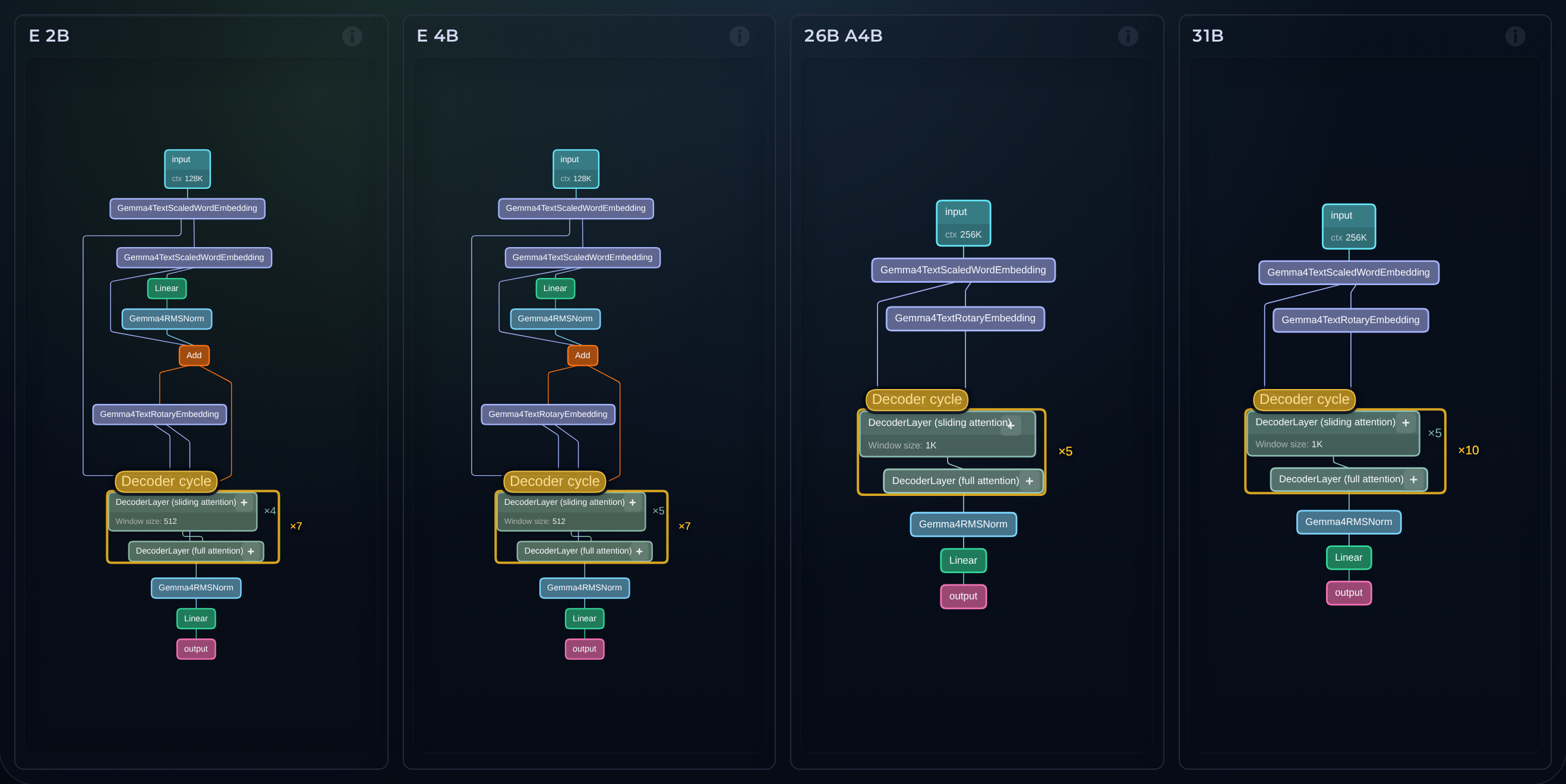
What keeps the family coherent is the shared attention backbone. Across the
lineup,
local sliding-window attention
is interleaved with
full global attention,
and the final layer is always global. The edge models use 512-token sliding
windows and 128K context, while
31B
and
26B-A4B
move to 1024-token windows and 256K context. That matters because it makes
long context an architectural choice rather than just a larger tokenizer
limit.
The expensive part of the stack is also where the main optimizations are
concentrated. The global layers use unified Keys and Values and apply
proportional RoPE,
while the cheaper local layers keep the familiar
standard RoPE
regime. The point is not that every layer sees the whole sequence all the
time; it is that the model restores global communication often enough to make
the large window operationally meaningful.
1
The edge models do more than add modalities
The smallest dense models are the most architecturally distinctive.
E2B
is listed as 2.3B effective parameters but 5.1B with embeddings, and
E4B
as 4.5B effective but 8B with embeddings. The difference comes from
Per-Layer Embeddings,
which give each decoder layer its own small embedding for every token instead
of forcing a compact model to preserve all linguistic detail through one
bottom-layer embedding alone. In the visible graph that extra path shows up as
layer-specific text embeddings feeding a
Per-layer projection
that keeps token-specific text structure available deeper in the stack.
2
That design choice matters because these are also the most ambitious
multimodal members at their size. All models accept
image input,
but only
E2B
and
E4B
add native
audio,
pairing roughly 150M-parameter
vision encoders
with roughly 300M-parameter
audio encoders.
In a compact multimodal decoder, reserved image and audio positions can
easily erode language precision. Giving later layers a direct token-specific
text signal is a clean way to preserve more of that structure.
1
The vision path is also more flexible than a fixed square-image pipeline. The
VisionEncoder
preserves natural aspect ratio, uses a 2D positional scheme so height and
width are represented separately, and exposes soft visual-token budgets of 70,
140, 280, 560, and 1120 tokens. At
masked_scatter,
projected image or audio features overwrite reserved placeholder positions in
the language-side sequence. That turns visual detail into an explicit
latency-quality knob: lower budgets make sense for captioning or video frames,
while higher budgets are better suited to OCR, document parsing, and small
text. After that replacement everything still goes through the same
Decoder cycle.
1
31B is the dense long-context member
The
31B
is the cleanest dense expression of the recipe. It has 30.7B parameters, 60
layers,
1024-token sliding windows,
256K context, and a much larger
~550M vision encoder.
There is no routing trick and no per-layer embedding trick here; the point is
always-on capacity for long documents, repositories, codebases, and large
multimodal contexts where dense quality matters more than the cheapest
possible token.
1
5 sliding + 1 full1024-token local window256K = 262,144 tokens
The upper grid magnifies the causal look-back band so the layer schedule
stays legible. The ratio strip keeps the real scale visible: most 31B
layers only read a 1,024-token local history, and every sixth layer is the
expensive causal full pass that reconnects the entire 256K
(262,144-token) context.
The deployment implication is straightforward. Loading the weights alone is
about 58.3 GB in BF16 or 17.4 GB in Q4_0, before runtime overhead and KV
cache. So 31B can be made local in quantized form, but its natural home is
still a serious workstation or server GPU when long-context and dense-model
headroom are the priority.
2
Position handling follows the same logic.
Rotary embedding
remains the positional backbone. RoPE is the mechanism that injects position
into attention by rotating the query and key vectors with a position-dependent
phase, so token order is represented inside the attention computation itself.
Gemma 4 does not use one RoPE regime everywhere, however.
Sliding-attention layers are annotated with standard RoPE,
while
full-attention layers are annotated with proportional RoPE.
Gemma 4's proportional variant changes the rotation schedule for the
long-range layers by using a much larger base period and rotating only part
of the attention head dimension. The long-range layers therefore age more
gracefully as sequence length grows, so the periodic full-attention passes
remain useful even when the sequence is very long. The point is clear: long
context is treated as an inference-systems problem as much as a modeling
problem.
26B-A4B changes the cost model
The
26B-A4B
asks a different question. It has 25.2B total parameters, 3.8B active
parameters, 30 layers, 1024-token sliding windows, 256K context, and an
expert layout of 8 active experts, 128 total experts, and 1 shared expert.
Instead of sending every token through the same feed-forward path, it uses a
Router
to decide which
Experts
handle each token. The model therefore exposes more conditional capacity only
where the token needs it.
1
That makes
31B
complementary rather than redundant with it. The dense model buys always-on
depth. The MoE model buys conditional feed-forward capacity. The savings,
however, are in active compute rather than residency: all 25.2B parameters
still need to be loaded for routing, which is why the Q4_0 load footprint is
still about 15.6 GB. That is close enough to 31B's 17.4 GB that 26B-A4B
makes the most sense on a gaming GPU or workstation, where you want much more
headroom than E4B without paying for a dense 31B-style forward pass on every
token.
2
Speed, accuracy, and the new local frontier
The edge speed story is the clearest. Published device measurements put E2B
at 52 GPU decode tokens per second on a Galaxy S26 Ultra, 57 on an iPhone 17
Pro, and 160 on a MacBook Pro M4 GPU. E4B lands at 22, 25, and 101 tokens
per second on those same device classes. That is fast enough to make the E
line feel genuinely interactive on phones and laptops rather than merely able
to run locally.
3
Those speeds do come with a ceiling. On MMLU Pro and GPQA Diamond, E2B
scores 60.0 and 43.4, E4B scores 69.4 and 58.6, 26B-A4B scores 82.6 and
82.3, and 31B scores 85.2 and 84.3. But the smaller models are still more
capable than their size class would suggest: E4B already edges the earlier
27B dense baseline on MMLU Pro and outperforms it decisively on GPQA
Diamond. That is a strong sign that the compact end of the family is not just
cheaper, but genuinely better positioned on the quality curve than the
previous generation.
1
The more important comparison is the same-latency one. In a recent controlled
benchmark,
E4B
reached 0.675 weighted accuracy at 5.458 seconds mean latency, while
Qwen3-8B reached 0.322 at 5.041 seconds. E2B reached 0.493 at 4.913 seconds,
versus Phi-4-reasoning at 0.427 and 4.857 seconds. That is the real win for
the small models: they still give up headroom to the larger members, but they
appear to deliver more accuracy at roughly the same latency as nearby
alternatives.
4
A compact deployment snapshot based on those published figures looks like
this.
Values are a deployment snapshot rather than a single apples-to-apples
benchmark across one toolchain and one hardware stack.
What Gemma 4 means
What makes the family interesting is that its members are not just scaled
copies of one another. The
E2B
and
E4B
edge models add per-layer text scaffolding and audio because compact
multimodal decoders need extra help preserving language precision under edge
constraints.
31B
stays dense because long-context quality benefits from always-on capacity.
26B-A4B
uses routing because a workstation can often afford the residency of a larger
model even when it cannot afford to spend dense 30B-class compute on every
token.
5
That gives practitioners a cleaner selection rule than parameter count alone.
Choose
E2B
or
E4B
when privacy, battery, latency, and offline multimodality are the
constraint. Choose
26B-A4B
when you have a gaming GPU or workstation and want a better
capacity-per-token bargain. Choose
31B
when dense quality and long-context reliability are worth building heavier
hardware around. The family's real contribution is that each member moves a
different bottleneck while still sharing the same architectural center.
1